Vectorize PNG to SVG Online vs Offline on Your Computer (Without Illustrator): Which to Choose?
Confidentiality, color, frequency, real vectors: the criteria for choosing between an online PNG to SVG converter and installed software, without Illustrator.
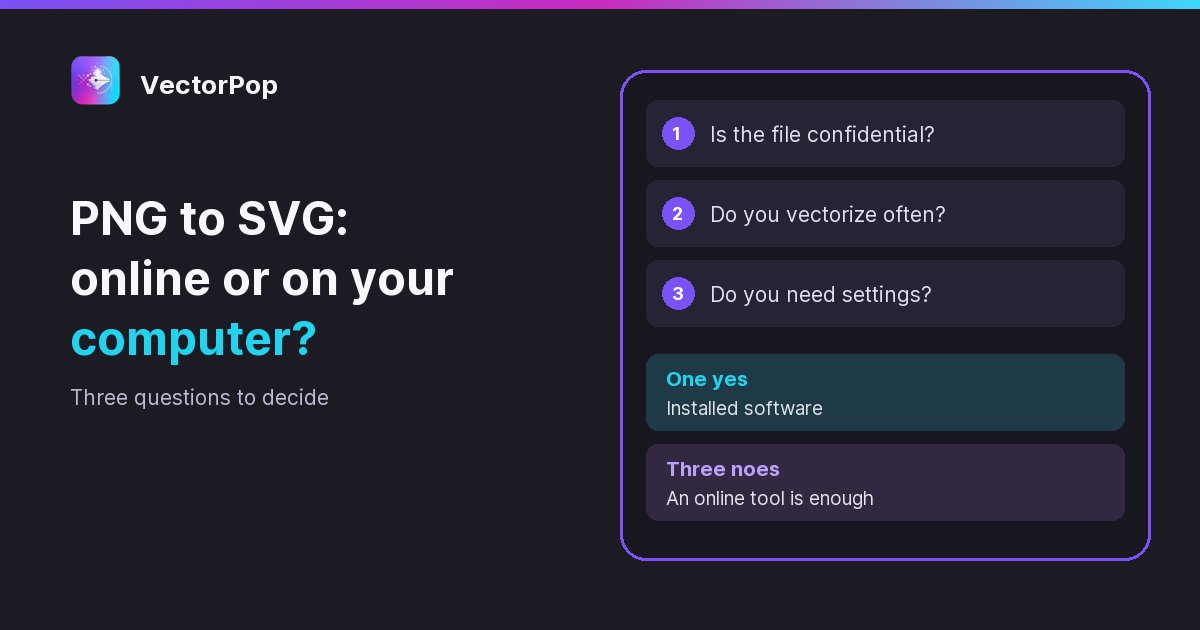
To convert a PNG to SVG, in color or black and white, without Adobe Illustrator: choose an online converter for a low-sensitivity file and a one-off need, and installed software for confidential logos, regular use or working without a connection. The deciding criterion is often confidentiality: with most online services, the file leaves your computer.
Neither option is better in absolute terms. Converting an icon for a talk does not carry the same demands as a client's logo going to a printer. This article gives you the criteria to decide, and two checks that almost nobody runs before trusting a converter.
What really happens with an online converter?
'Online' covers two very different setups. In the first and most common, your image is sent to a server, processed there, and the SVG comes back to you. So the file has been copied elsewhere, at least for the time of the conversion. Some services announce deletion after an hour, others say nothing precise.
In the second, the processing happens in your browser: the page loads the program, and the image stays on your machine. That is good news for confidentiality, provided you check it rather than take it on trust. The test is simple: load the page, cut your connection, then run the conversion on an unimportant file. If it completes, the processing is local. If you are comfortable with it, you can also open the Network tab of the developer tools and see whether the file goes out.
What are the strengths and limits of an online tool?
- Strengths: nothing to install, a result in seconds, usable from any computer, often free for a trial.
- Limits: the file goes to a third party in most cases, caps on size or number of conversions, few settings, a connection is required, and a service can change its terms or disappear.
For an icon, a pictogram or an image of no value, these limits do not matter. They become real when you start over ten times to adjust a result, or when the file belongs to someone else.
What are the strengths and limits of installed software?
- Strengths: the file stays with you, the software works offline, you can run as many trials as you need without resending anything, and you keep control of the settings.
- Limits: an installation, updates, a learning curve that varies, and sometimes paid features.
Doing without Illustrator is no problem at all. Inkscape is free and traces images; it is a full editor, so it is powerful, but you have to learn where the settings live. VectorPop does one thing: you drop the image, choose a preset and export the SVG. Our step-by-step tutorial shows the whole process, and the complete guide to vectorizing an image compares the methods.
A word of honesty about 'offline': local software is not necessarily cut off from the internet 100% of the time. In VectorPop, vectorizing needs no connection and does not send your images, but activating a Pro license goes through the internet, as does the first download of the optional AI module. Look at this point with any vendor: what matters is that the image itself does not leave.
Which criteria should decide?
Confidentiality
A client's logo, an unannounced brand, an internal document: these files do not always belong to you, and a contract may forbid handing them to a third party. In that case local settles the question, as detailed in our article on how to vectorize without uploading the file to the internet. If you prefer an online service, read its privacy policy before uploading: where do files go, for how long, and what are they used for?
Frequency
One conversion a year justifies installing nothing. If you vectorize every week, the limits of free tools and the back-and-forth end up costing more time than a single installation.
The result you expect
Tools are not equal on color: some produce only black and white, others cut the palette sharply. Check this if your logo has several shades. Also see whether you can act on the number of colors and on cleaning up small specks, because a perfect trace at the first attempt is rare.
Cost over time
Compare the right models: a monthly or per-use service against a one-time purchase. A subscription makes sense for heavy use, less so for a need that comes in waves. VectorPop, for example, includes 5 free SVG exports, then costs €39 once, with no subscription.
How do you check the SVG is a real vector?
This is the least known trap, and it mostly affects the simplest converters: a file can carry the .svg extension and contain a plain pixel image wrapped in code. It is heavy, stays blurry when enlarged, and your printer will reject it. Two checks take a minute:
- Zoom to 800%: edges must stay sharp. If they turn into steps or blur, it is not vector.
- Open the file in a text editor such as Notepad: you should see path tags. An image tag followed by a long run of characters means a hidden PNG.
The same test applies to a conversion from a JPG, with its own defects, covered in our guide to converting a JPG to SVG.
How do you compare without taking a risk?
Take a non-sensitive logo, or a test version, and run it through the online tool and through installed software. Then look at the same points: how faithful the curves are when zoomed, the colors kept, the number of small stray shapes, and the time it took to get a usable result. You will then know which tool to keep for your real files.
Here is what we would suggest in each case:
- An icon for a presentation, just once: an online tool.
- A client's logo or an unpublished brand: installed software, no question.
- Logos every week: installed software, for the settings and the cost.
- A PC without installation rights and a file with nothing at stake: an online tool, checking the result.
- A job site with no connection: installed software, the only option.
Conclusion: confidentiality first
Ask the questions in this order: can the file leave my computer, how often will I do this again, then what is the budget. If you want an installed solution without going through Illustrator, try VectorPop for free: 5 SVG exports included, local processing on Windows, Linux or Android, and a Pro version at €39 as a one-time payment.
Frequently asked questions
Is an online PNG to SVG converter safe?
For a file with nothing at stake, yes in most cases. For a sensitive file, read the privacy policy, or test whether the processing happens in the browser by cutting the connection after the page loads.
Can I vectorize a PNG without Illustrator?
Yes. Inkscape does it for free, VectorPop does it in a few clicks, and many online converters offer the same operation.
Can I vectorize offline?
Yes, with installed software. Some browser tools also keep working once the page has loaded, but you need to check.
Can I get a color SVG?
Yes, provided the tool handles color: some produce only black and white. VectorPop offers color presets and a black and white preset.
How do I know if my SVG contains a hidden image?
Open it in a text editor. An image tag with a long run of characters indicates a wrapped PNG, while real path tags indicate vector data.
Got a logo stuck in a PNG?
Try VectorPop free and turn it into a clean, editable SVG — on your own machine.
Get VectorPop