What Is a Vector File? A Simple Explanation
What a vector file (SVG, PDF, EPS, AI) really contains, how it differs from a PNG, and how to check in one minute that yours is truly vector.
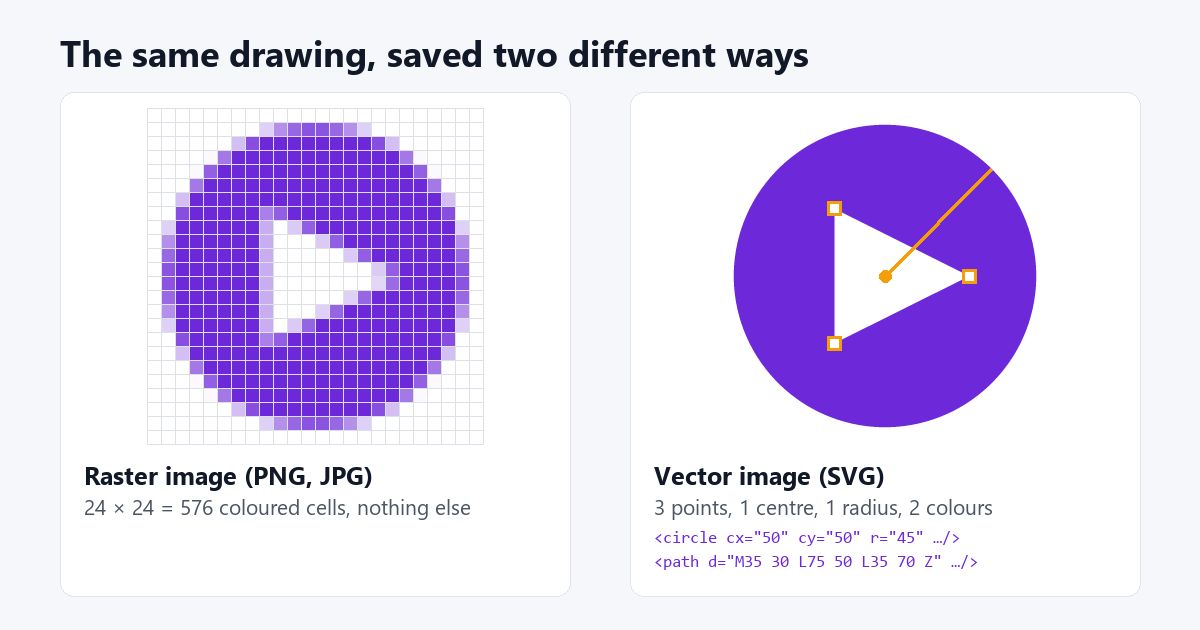
A vector file describes an image with shapes (points, lines, curves, colours) instead of a grid of pixels. The software that opens it redraws those shapes at the size you ask for, so the result stays sharp on a business card and on a shop sign alike. The most common formats are SVG, PDF, EPS and AI, but the extension is not enough: a .svg or .pdf file may contain nothing but a picture.
Rather than stay with theory, this article opens a real vector file to show what is inside, gives measured file sizes, then explains how to check that yours is truly vector before sending it to a supplier.
What does a vector file actually contain?
Text, in the case of SVG. Here is the drawing shown above, a white triangle inside a purple disc. It takes two instructions:
- <circle cx="50" cy="50" r="45" fill="#6D28D9"/>
- <path d="M35 30 L75 50 L35 70 Z" fill="#FFFFFF"/>
The first one says: a circle centred on point (50, 50), radius 45, filled with purple. The second: go to point (35, 30), draw a line to (75, 50), then to (35, 70), close the shape, fill it with white. With the header tag around them, the whole file weighs 172 bytes. Replace 45 with 30 in a text editor, save, and the disc shrinks: that is what people mean when they say a vector stays editable.
A real logo follows the same principle with more points. Our demo logo, traced by VectorPop from a 600-pixel PNG (the flat logo preset), gives 4 paths in 3 colours, described by about 260 segments. The whole image is there: the file holds no pixels at all.
How is it different from a pixel image?
A raster image (PNG, JPG, WebP) is a grid. At 24 × 24 pixels, our drawing becomes 576 cells, each with its own colour; the circle and the triangle no longer exist as such, only purple, white and in-between cells remain. Enlarging the image means enlarging the cells, hence the blur or staircase effect explained in blurry logo when enlarged.
For a vector, changing size leaves the shapes alone. We checked by asking VectorPop to resize the traced logo to 10,000 pixels: the paths stayed strictly identical, only the dimensions declared at the top of the file changed, for 26 extra bytes.
File size deserves some nuance, because 'a vector is always lighter' is false. Our measurements:
- Simple drawing (disc and triangle): 172 bytes as SVG, against about 29 KB as a 1,000-pixel PNG and 165 KB as a 4,000-pixel PNG.
- Automatically traced logo: 18.7 KB as SVG, against 19.7 KB for the 600-pixel PNG it came from. Almost a tie; the gap widens at large sizes, since the same logo as a 4,000-pixel PNG weighs 193 KB.
- Detailed landscape (a wallpaper reduced to 1,000 pixels): 81 KB as JPG, but 968 KB once vectorized, with 934 paths and 459 colours. Twelve times heavier, for a less faithful result.
So vector wins when the image boils down to a few shapes, and loses when it is made of subtle shades. To choose by use case, see SVG vs PNG: when to use which.
Which file formats are vector?
- SVG: the vector format of the web, written in XML, so readable in a text editor. Browsers, Inkscape, Figma and Illustrator open it.
- PDF: a container. It can hold paths, text, images, or all three on the same page. Very common in printing.
- EPS: older, still requested by some printers and workshops.
- AI: Adobe Illustrator's working format.
Conversely, PNG, JPG, WebP, GIF and BMP are raster. VectorPop exports SVG, and vector PDF with the Pro version; it produces neither EPS nor AI. If a supplier insists on those, the conversion happens in drawing software starting from the SVG or PDF. The simplest is still to ask what they accept: we explain their reasons in why printers ask for vector files.
How can you check that a file is truly vector?
Renaming logo.png to logo.svg converts nothing, and some converters merely wrap the picture inside an SVG file. The makers of CorelDRAW point it out: an EPS, SVG or PDF extension does not guarantee vector content. The format itself allows it: SVG has an image tag meant to display raster files. Three quick tests:
- Zoom, for every format: enlarge to 800% or more on a curved edge. An edge that stays sharp is a path; an edge that blurs or shows squares is a picture. At 100%, both look alike.
- Text editor, for an SVG: open it in Notepad. path, circle, rect or polygon tags mean shapes; an image tag followed by a long run of characters means a hidden PNG.
- Selection, for a PDF, EPS or SVG: open the file in drawing software such as Inkscape and click one letter of the logo. If you can select it and change its colour, it is a path; if the whole logo selects as a single rectangle, try ungrouping first, and if there is nothing to ungroup, it is probably a picture.
We built the fake to compare. The 600-pixel PNG of our logo, wrapped in an SVG: 0 paths, 1 image, and 26.4 KB, a third more than the PNG itself. It opens everywhere and carries the right extension, but it blurs just like the original. Same experiment with PDF: the pasted PNG gives 1 image and 0 vector drawings, whereas the PDF exported by VectorPop contains 0 images and 8 vector drawings.
A file can also be mixed: letters as paths and an icon as a picture, for example. So zoom in on each element, not just the first one you see.
When is a vector file the wrong choice?
For a photo, a screenshot, a texture or a painted illustration, keep a pixel format. The landscape measurement shows it: hundreds of shapes are needed to approximate the shades, and the file balloons. Another case is platforms that refuse SVG: export a PNG at the right size from your vector file, which remains the original to keep.
And a vector file is not automatically a good file. A path can be sharp and still be riddled with stray pieces or useless points; why too many SVG nodes are a problem shows why cutting machines struggle with that.
How do you get a vector file?
- Find the original: ask the designer or agency for the source file (AI, EPS, SVG, PDF). It is always the best version, because nothing was guessed.
- Draw it: in Inkscape, Illustrator or other vector software. Fine for simple shapes, slow for a complex logo.
- Vectorize an existing image: the software finds the outlines and redraws them as curves. It is a reconstruction, not a recovery: the cleaner the starting image, the more accurate it is.
For the third route, the complete guide to vectorizing an image compares the methods, and vectorize a PNG logo step by step walks through the settings. VectorPop does this work on your computer, without uploading the image: 5 free SVG exports in total, then €39 once for the Pro version.
Conclusion
A vector file contains shapes, a raster image contains coloured cells: everything else follows, from sharpness to cutting. Above all, remember that the extension proves nothing. Before sending a 'vector file', zoom to 800% and, for an SVG, glance at the text: one minute is enough to avoid a round trip with the printer.
Frequently asked questions
Is an SVG always vector?
No. SVG is a vector format, but it can contain a wrapped PNG or JPG picture. Open it in a text editor: path, circle or rect tags mean shapes, an image tag means pixels.
Is a PDF a vector file?
It can be. A PDF is a container that accepts paths, text and images. Zoom to 800%: if the edges stay sharp, the element is vector; if they blur, it is a picture.
Can a JPG or PNG be vector?
No, they are pixel formats. Renaming the file changes nothing: it has to be vectorized, meaning its outlines are redrawn as curves.
Is a vector file always lighter?
No. A simple drawing weighs very little (172 bytes in our example), but a vectorized landscape went from 81 KB as JPG to 968 KB as SVG.
How do I open a vector file without Illustrator?
An SVG displays in any recent browser and can be edited for free with Inkscape, which also opens PDFs.
Got a logo stuck in a PNG?
Try VectorPop free and turn it into a clean, editable SVG — on your own machine.
Get VectorPop